
Withdrawal PH365 guide: cash out your PH365 winnings safely
Withdrawal PH365 is the final step that turns your winnings into real money in your bank account. This guide explains the process, the limits, the turnover rules, and the errors to avoid. Follow it closely and your PH365 payout can arrive within minutes.
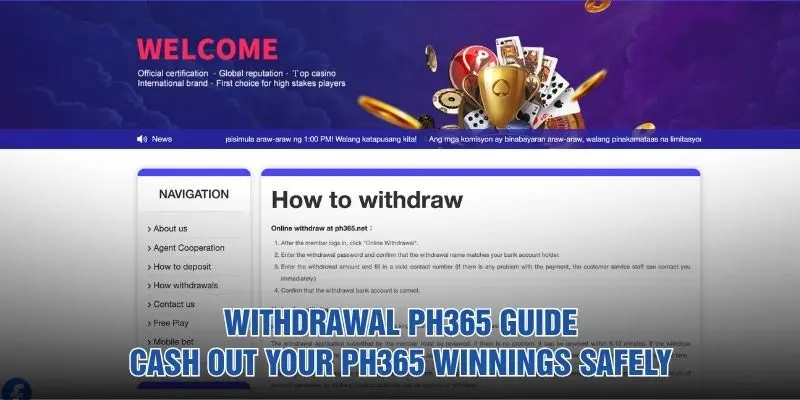
What is Withdrawal PH365 and how does it work?
Before you send a request, it helps to know how the system treats your payout. These are the key facts every member should understand.
- A withdrawal moves money from your member balance to the bank account registered under your own name.
- Requests are made through the Online Withdrawal option, which appears only after you log in to your PH365 account.
- Every request is reviewed by the platform before payment, which protects both members and the company.
- If the review finds no problem, the money can be received within 5 to 10 minutes.
- Only one request can be active at a time, so the current withdrawal must finish before you send another.
- The withdrawal name must match the bank account holder, or the request can be delayed or refused.
- Support from PH365 is available 24/7 if you have any question about your payout.
Requirements and limits before you withdraw
Every payout must meet a few conditions. The table below shows what applies to Withdrawal PH365 requests.
| Item | Details |
|---|---|
| Account status | Registered member who is logged in |
| Minimum withdrawal | ₱100 for a single withdrawal |
| Maximum withdrawal | Unlimited |
| Withdrawal password | Required to confirm each request |
| Account name | Must match the bank account holder |
| Contact number | A valid number so staff can reach you |
| Active requests | Only one at a time |
| Typical processing time | 5 to 10 minutes if there is no problem |
| Turnover | Effective bets must reach 100% of each deposit |
Always confirm the latest figures in the member center before you apply. Rules can change, and the official page is the most reliable source.
Before you withdraw: a quick checklist
A few minutes of preparation prevents most rejected requests. Check each point below first.
- Log in to the correct member account and confirm the balance you want to withdraw.
- Make sure your amount is at least the ₱100 minimum.
- Check that your bank account is active and registered under your own name.
- Have your withdrawal password ready, and reset it first if you have forgotten it.
- Prepare a phone number you can answer in case customer service calls.
- Review your turnover to confirm that your deposits are fully wagered.
- Use a stable connection so the PH365 page does not time out in the middle of your request.
How to withdraw money step by step
The process takes four stages and works on both desktop and mobile. Follow them in order.
Log in and open Online Withdrawal
Sign in to your member account and open the member menu. Click Online Withdrawal to reach the payout form. Only logged-in members can use this page, so create your PH365 account first if you have not registered yet.
Enter your withdrawal password and check the name
Type your withdrawal password and confirm that the withdrawal name matches your bank account holder. A mismatch is one of the most common reasons a payout is delayed or refused. Take a moment to compare both names.
Enter the amount and contact number
Enter the amount you want to cash out, starting from ₱100. Add a valid contact number so staff can reach you immediately if a problem appears. For a smooth Withdrawal PH365 request, avoid refreshing the page at this stage.
Confirm the bank account and submit
Check that the withdrawal bank account is correct, then submit the request. The platform reviews it, and the money can arrive within 5 to 10 minutes. Keep a screenshot until the funds arrive, and let the current Withdrawal PH365 request finish before you send another.
Withdrawal destination and processing time
The platform describes payouts to your registered bank account, and options can vary by region, so check the member center for anything extra. Every Withdrawal PH365 payout passes through the same stages below.
| Stage | What happens | Typical time |
|---|---|---|
| Submission | You send the request through Online Withdrawal | Immediate |
| Review | Your account and turnover are checked | Part of the 5 to 10 minutes |
| Payment | Funds are sent to your registered bank account | 5 to 10 minutes if no problem |
| Delay | The request needs extra checks or contains an error | Contact support if it takes much longer |
| Next request | You can submit again once the current one is complete | After completion |
If the money has not arrived after a reasonable time, contact customer service with your receipt. PH365 support can trace the request and explain its status.
Turnover rules that affect your payout
Turnover is the rule that surprises new members most. Understand it before you request a payout.
- The platform reserves the right to review the member account before a withdrawal is approved.
- The effective bet amount must reach 100% of each deposit you have made.
- Turnover generated by promotion activities can be applied toward the withdrawal requirement.
- Different games are calculated with different betting methods, so valid bets vary from game to game.
- Rounds that are not accepted or are cancelled are not included when valid bets are counted.
- Check your totals before you start a Withdrawal PH365 request so you avoid an unnecessary rejection.
- If the numbers look wrong, ask customer service at PH365 to explain your balance.
Common Withdrawal PH365 errors and how to fix them
Most payout problems are small and easy to fix. These are the cases members meet most often.
Name does not match the bank account
The withdrawal name must match the bank account holder. If it does not, the request may be refused or delayed. Correct the bank details or contact support before you try again, and make sure the account belongs to you.

Wrong withdrawal password
An incorrect password blocks the request. Type it slowly, check your keyboard language, and avoid copying extra spaces. If you have forgotten it, contact customer service for help instead of guessing many times.
Amount below the minimum
Any request below ₱100 will not be accepted. Check the figure before you confirm, because a typing error can change the sum. Raise the amount to at least the minimum, and your Withdrawal PH365 request can go through review.
Second request blocked
Only one withdrawal can be active at a time. If you send another request too early, the system will not accept it. Wait until the current payout is completed, then submit the next one. This rule applies to every PH365 account.
Request pending or turnover not met
A pending request may mean the review is still running, or that turnover is below 100% of your deposits. Check your bets first, then wait a few more minutes. If nothing changes, contact support with your receipt.
Slot game issues that can affect your winnings
Problems during play can also affect what you are able to cash out. Keep these rules in mind while you play.
- Disconnection or logout during a game is regarded as improper operation by the member.
- Losses such as invalidated or cancelled winnings caused by that event are not covered by the platform.
- The company accepts no responsibility for problems that are not caused by its own system.
- Check your network and device before you spin, so a weak connection does not damage your rights.
- Avoid switching apps or closing the browser in the middle of a round.
- Play from the PH365 lobby only when your connection is stable and your battery is charged.
- Report anything unusual to customer service immediately, and keep a screenshot as evidence.
Tips for safe and fast withdrawals
Good habits make every payout quicker and safer. Apply them each time you cash out.
- Always start from the Online Withdrawal option inside your logged-in member menu.
- Never share your password, withdrawal password, or verification codes with anyone.
- Withdraw to a bank account that belongs to you, because name mismatch is a leading cause of delays.
- Save a receipt or screenshot for every request until the money arrives.
- Plan each Withdrawal PH365 payout after you confirm that your turnover is complete.
- Treat gaming as entertainment, and only play with money you can afford to lose.
- Contact PH365 support at any hour if something looks unusual.
Frequently asked questions about withdrawals
Here are quick answers to the questions members ask most.
What is the minimum and maximum withdrawal?
The minimum for a single request is ₱100, and the maximum is unlimited. Check the member center for any update before you apply.
How long does a withdrawal take?
If the review finds no problem, funds can be received within 5 to 10 minutes. Delays usually come from account issues, unmet turnover, or bank-side processing.
Can I send two requests at once?
No. The current request must be completed before the next one can be submitted. Wait for the status to finish, then try again.
What turnover do I need?
The effective bet amount must reach 100% of each deposit. Turnover from promotions can be applied toward the requirement. Ask PH365 support if you are unsure how your own numbers look.
Can I get help at any time of day?
Yes. Customer service is available 24/7 through the PH365 site, so you can ask questions whenever you need to. Contact the team quickly if your Withdrawal PH365 request looks stuck.
Conclusion
With the steps above, Withdrawal PH365 becomes a quick routine: check your turnover, confirm your name, and submit one clean request. Keep your receipt in case you need help, and wait for each payout to finish. With PH365 support available around the clock, you can cash out with confidence.