
Deposit PH365 guide: Fund your PH365 account in minutes
Deposit PH365 is the first step to enjoying every game on the platform, and it takes only a few minutes when you know the process. This guide explains how to fund your PH365 account, which payment methods are supported, and what to do if something goes wrong. Read each section carefully to avoid the most common mistakes.
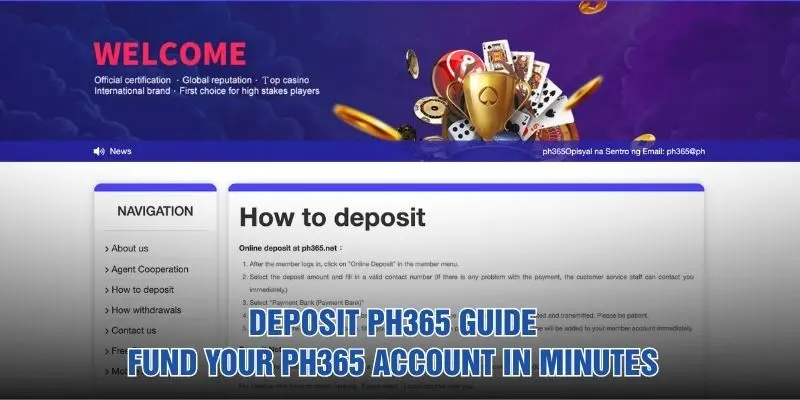
What is Deposit PH365 and why does it matter?
Before you add money, it helps to understand how a deposit works. These are the basics every new member should know.
- Deposit PH365 means adding real funds to your member balance so you can play slots and other games on the platform.
- The process runs through the Online Deposit page inside your member menu, not through an unknown third-party site.
- A PH365 account must be registered and logged in before the deposit page becomes available.
- Most deposits are credited within about 5 minutes, and funds are added to your member account immediately once payment succeeds.
- The deposit options offered may vary depending on your country of residence, so check the member center for accurate information.
- The system loads a bank page and encrypts your account data during transmission, which helps protect your details.
- You need a valid contact number so customer service staff can reach you quickly if a payment problem appears.
- Support from PH365 is available 24/7 if you have any question during the process.
Deposit PH365 requirements and limits
Every deposit must meet a few simple conditions. The table below summarizes what you need and the limits that apply.
| Requirement | Details |
|---|---|
| Account status | Registered member who is logged in |
| Minimum deposit | ₱50 for a single deposit |
| Maximum deposit | ₱500,000 limit |
| Contact number | A valid number so support can reach you if needed |
| Payment channel | A supported e-wallet or bank account you can access |
| Typical arrival time | Within 5 minutes in most cases |
Plan your amount carefully and confirm the current figures in the member center before paying. PH365 may update its payment rules from time to time, so the member center is always the most reliable source.
Before you deposit: a quick checklist
A little preparation prevents most payment problems. Run through this list before you start.
- Confirm that you are logged in to the correct member account.
- Check that your e-wallet or bank balance covers the amount you plan to send.
- Choose an amount between the ₱50 minimum and the ₱500,000 limit.
- Prepare a phone number that you can answer if support calls.
- Make sure your internet connection is stable, and avoid weak public Wi-Fi.
- Keep your wallet app or online banking login details ready.
- Close unnecessary browser tabs so the payment page loads smoothly.
- Set a personal budget before you deposit, and stick to it.
How to Deposit PH365 step by step
The process is short and works the same on desktop and mobile. Follow these four stages in order.
Log in and open the deposit page
Sign in to your member account and open the member menu. Click on Online Deposit to reach the payment page. If you have not registered yet, create your PH365 account first, because only logged-in members can fund a balance.
Choose the amount and enter contact details
Select the deposit amount that fits your budget and stays within the allowed limits. Then fill in a valid contact number so customer service can reach you immediately if a problem occurs. To Deposit PH365 smoothly, avoid refreshing the page during this stage.
Select the payment bank and approve payment
Choose the Payment Bank option and send your confirmation. The web bank page will load while your account data is encrypted and transmitted, so please be patient. Once the page opens, fill in your information and approve the payment.
Confirm that your balance has arrived
When the payment succeeds, the funds are added to your member account immediately. Check your balance in the member center to make sure the amount is correct. Then return to the PH365 game lobby and start playing.
Payment methods to Deposit PH365
Players can choose from several channels, and the best one depends on your region and habits. Here is how each supported option compares when you Deposit PH365.
| Method | Best for | Key point |
|---|---|---|
| GCash | Mobile e-wallet users | Pay directly from your phone |
| Paymaya | Maya wallet holders | Pay from your wallet balance |
| GRABPay | Grab wallet users | Pay from your wallet balance |
| Bank transfer | Members with online banking | Use the Payment Bank option |
| Bank counter | Members without online banking | Visit a bank counter near you |
Available methods can change, so open the member center to see what is offered to you. PH365 keeps working on its payment solutions to serve more players over time.
Common Deposit PH365 errors and how to fix them
Most deposit problems are small and easy to solve. These are the issues players meet most often.
Balance not showing after payment
Most deposits arrive within about 5 minutes, but banks and wallets sometimes take longer. Refresh the member center and check your transaction history first. If the money has not appeared after 20 minutes, contact customer service with your receipt. The team at PH365 can then trace the payment quickly.
Payment failed or page not loading
A weak connection, an expired session, or a wallet without enough funds often causes this. Check your internet, confirm your balance, and log in again. Then restart the process and Deposit PH365 once more through the Online Deposit menu.
Wrong amount entered
An amount below ₱50 or above the ₱500,000 limit will not be accepted. Review every field before you confirm, because a typing mistake can send the wrong sum. If you already paid an incorrect amount, keep your receipt and contact customer service right away.
Invalid contact number
If your number is wrong or inactive, support cannot reach you when a payment issue appears. This can slow down the solution and leave you waiting longer than necessary. Update your phone number before depositing, and answer calls from the support team.
Deposit option missing from your account
Deposit options can vary depending on your country of residence. If a method you expected is not listed, check the member center for the channels available to you. Choose another supported method, or ask customer service which option fits your region. Support at PH365 can guide you to a working alternative.

Tips for a safe and smooth deposit
Good habits keep every transaction secure and stress-free. Keep these points in mind each time you add funds.
- Always start from the Online Deposit option inside your logged-in member menu.
- Use only supported methods, and never send money to accounts shared by strangers.
- Save your payment receipt or screenshot until the balance appears.
- Start with a small amount, such as the ₱50 minimum, if you are new to Deposit PH365.
- Keep your contact number up to date so support can reach you quickly.
- Never share your password, wallet PIN, or verification codes with anyone.
- Treat gaming as entertainment, and only deposit money you can afford to spend.
- Contact the PH365 support team at any hour if something looks unusual.
Frequently asked questions about deposits
Here are quick answers to the questions players ask most.
What is the minimum and maximum deposit?
The minimum for a single deposit is ₱50, and the maximum limit is ₱500,000. These figures apply to your PH365 account, but always check the member center for any changes.
How long does a deposit take?
Most deposits arrive within about 5 minutes. If your balance is still missing after 20 minutes, contact customer service for help.
Which payment methods are supported?
GCash, Paymaya, GRABPay, and bank transfer are supported. Members without online banking can visit a bank counter near them. Many players use an e-wallet when they Deposit PH365, though availability depends on your region.
What should I do if the payment page does not load?
Check your internet connection and make sure you are still logged in. Wait a moment, since the page may need extra time to load your encrypted account data. If it still fails, restart the deposit process from the member menu.
Do I need to provide a contact number?
Yes. A valid contact number lets customer service reach you quickly if there is any problem with the payment. It is a small detail that can save you a lot of waiting time.
Can I get help at any time of day?
Yes. Customer service is available 24/7 through the PH365 site, so you can ask questions whenever you need to.
Conclusion
Following the steps above, you can Deposit PH365 safely and receive your balance within minutes in most cases. Check the limits, choose a supported method, and keep your receipt in case you need help. With PH365 support available around the clock, you can enjoy your games with confidence.